The computer in the back office is still working. That's the problem.
Every independent retailer has one: the PC that runs fine, the card reader that's been on the counter for years, the software version that nobody has gotten around to updating. If it isn't broken, why fix it?
Because today, "working" and "safe" are no longer the same thing. Artificial intelligence has changed how fast attackers find and use weaknesses in old technology. A flaw that once took weeks to turn into an attack can now be weaponized in hours. Equipment that is no longer supported by its maker never gets the fix.
This article covers what "unsupported" really means, why AI has raised the stakes, why security is a job for your whole team, and how moving your business management system to the cloud takes the heaviest part of the load off your shoulders.
What "unsupported" really means

When a manufacturer or software publisher ends support for a product, it doesn't stop working. It stops getting better, and it stops getting safer. Nothing switches off on the end-of-support date, which is exactly why so many businesses keep running past it.
Here's what changes the day support ends:
- No more security patches. New weaknesses are still discovered, but no fix is ever released. Every one stays open for good.
- No more help when something breaks. If an update, a new device or a failed component causes a problem, there's no one obligated to fix it. A small failure can force a rushed, expensive replacement at the worst possible time.
- Compatibility drifts. Newer browsers, payment devices, printers and apps stop being tested against older systems. Things start to fail in small, unpredictable ways.
- Compliance gets harder. Payment card security standards and many cyber insurance policies expect systems that receive security updates. Unsupported equipment can put both at risk.
This applies to more than your computers' operating system. It includes the business software you run, the version you're on, the database underneath it, and every connected device in the building.
With AI, attackers are moving faster than ever
AI is a powerful tool for running a business. It's an equally powerful tool for attacking one. Across the security industry, the trend is consistent: attackers increasingly get in through known weaknesses in software, and AI keeps shrinking the time between a flaw becoming public and that flaw being used against real businesses.
- Old weaknesses are the easiest way in. Exploiting a known software flaw has become one of the most common ways attackers break into a business, ahead of stolen passwords.
- The window is now hours, not weeks. AI helps attackers read a security notice, build a working attack and scan the internet for targets almost immediately.
- Defenders are struggling to keep pace. Even well-staffed IT teams often take weeks to apply a fix across all their systems.
Now consider what that means for a system that never gets a fix at all. If businesses with full IT departments struggle to keep up, an unsupported system is permanently on the wrong side of that race.
AI also makes the human side of attacks more convincing. Criminals use it to write polished phishing emails, research targets and impersonate trusted contacts. The telltale spelling mistakes are gone. Calls and voice messages can sound like a real supplier, a bank or your own manager.
Small businesses are not too small to target
It's tempting to think attackers only go after big companies. In reality, small and midsize businesses make up the large majority of ransomware victims. Most attacks are opportunistic: automated tools look for unpatched systems and limited security resources, wherever they are. AI lets attackers scan for those openings at a scale no human team could.
Where the risk hides in a typical store
Most outdated technology isn't hiding. It's just easy to stop noticing. Walk your business and look for:
- Back-office and counter PCs running an operating system that no longer receives security updates.
- The server in the closet that hosts your business data and hasn't had a hardware or software refresh in years.
- Old versions of business software, including your point of sale, accounting or inventory system, that the publisher no longer maintains.
- Network equipment such as routers, firewalls and Wi-Fi access points with outdated firmware or default passwords.
- Connected peripherals: payment terminals, receipt printers, scanners, cameras and smart devices that quietly sit on the same network as your business data.
- Personal phones and laptops that staff use to check email, approve orders or log in remotely.
- Remote access tools set up years ago by a past employee or vendor and never reviewed.
Each one is a door. Attackers only need one left open to reach everything behind it.
Security is a team sport
Up-to-date technology closes the doors. Your people decide whether someone gets invited in. Year after year, most breaches involve a person somewhere along the way: a click on a convincing link, a reused password, a payment approved on a phone call that felt real.
You don't need a security department to build good habits. You need everyone, from the owner to the newest part-timer, to know a few rules:
- Slow down on urgency. "Pay this today," "your account is locked," "I need gift cards for a client" are classic pressure tactics. Verify by calling a number you already have, not the one in the message.
- Use multi-factor authentication everywhere it's offered, especially email, banking and your business management system.
- Use unique passwords and a password manager. Never share logins between staff.
- Give people only the access their job needs, and remove it the day someone leaves.
- Be careful what you paste into AI tools. Customer lists, pricing and financial reports don't belong in free, personal AI accounts, and many employees use exactly those on work devices.
- Report mistakes fast, without blame. A quick "I think I clicked something" is far cheaper than a problem found weeks later.
- Keep the conversation going. A five-minute reminder at a staff meeting each month does more than one long training a year.
Your business management system holds the crown jewels
Of all the technology in your business, your business management system deserves the most protection. It's where your business actually lives:
- Customer names, contact details and purchase history
- Supplier relationships, costs and pricing
- Inventory, orders and serial numbers
- Sales, receivables and financial records
- Employee user accounts and permissions
If that data is stolen, it can be sold or used to target your customers. If it's encrypted by ransomware, you can't sell, receive or invoice until it's restored. If it's simply lost to a failed server with a stale backup, you may never fully recover it.
That makes the system running it, and the hardware and software underneath, the single most important thing to keep supported.
How System Five on Cloud helps reduce your risk
Windward System Five on Cloud is designed to take the hardest parts of protecting your business data off your plate. Instead of a server in your back room that you have to patch, back up and defend, your System Five data runs in professionally managed data centers, protected by layers of security that would be difficult and costly for most independent businesses to build on their own.
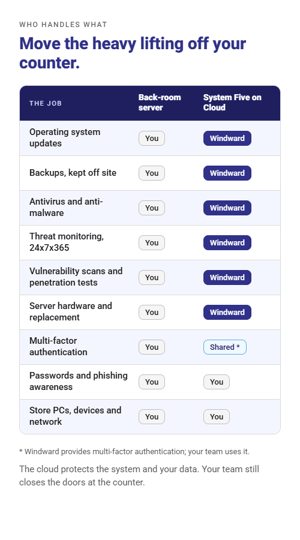 What's included:
- Operating system updates applied automatically. No more falling behind on patches or running an unsupported server.
- Automated, scheduled backups of your critical business data, retained on a rolling schedule.
- Antivirus and anti-malware protection, including AI-assisted security tools.
- Multi-factor authentication to protect against stolen or guessed passwords.
- DNS-level security in our data centers to block known malware and malicious sites.
- An active threat detection team working 24x7x365 to investigate potential issues and help with remediation.
- Ongoing vulnerability scanning to find software that needs updating or configuration that needs hardening.
- Penetration testing to find weaknesses based on the techniques attackers are actually using.
And your team keeps the same familiar System Five interface they use every day, so better protection doesn't mean starting over.
What stays in your hands
Cloud hosting protects the system and the data. It can't stop someone at your counter from clicking a bad link or reusing a password. Moving to the cloud works best alongside current devices in your store and a team that knows the rules above. Together, they close the gaps attackers look for.
Your 30-day action plan
You don't have to fix everything at once. Start here:
- Take inventory. List every computer, server, device and piece of software in the business, with its age and version.
- Check support status. For each item, find out whether the maker still releases security updates. Flag anything that doesn't, or will stop within the next year.
- Prioritize by what it touches. Anything that stores or reaches customer, payment or financial data goes to the top of the list.
- Turn on multi-factor authentication for email, banking and your business management system this week.
- Test a restore. A backup you've never restored is a guess. Make sure you can actually get your data back.
- Brief your team. Spend 15 minutes on the rules above, and name who staff should tell when something looks wrong.
- Budget the replacements. Plan upgrades on your schedule, before a failure or an incident sets the schedule for you.
- Talk to us about moving to the cloud. For System Five customers, moving to System Five on Cloud removes the server and its upkeep from your list entirely.
Frequently asked questions
Will my older system stop working when support ends?
Usually not, and that's the trap. Unsupported technology keeps running, but it no longer receives security fixes or help when something goes wrong. The risk grows quietly every month, and any failure can force an unplanned upgrade.
Is a small business really a target?
Yes. Most attacks are automated and opportunistic. They scan for unpatched systems and weak passwords regardless of company size, and small and midsize businesses make up the large majority of ransomware victims.
Is my data safer in the cloud than on my own server?
For most independent businesses, yes. A managed cloud environment provides automatic updates, scheduled off-site backups, multi-factor authentication and around-the-clock monitoring, which are difficult and expensive to maintain on a single in-store server.
Do I need new hardware to move to System Five on Cloud?
Most existing hardware works with System Five on Cloud, and you no longer need a local server. A consistent internet connection is required. Your account manager will review your setup before you migrate.
Does moving to the cloud mean my team has to learn a new system?
No. System Five on Cloud uses the same familiar interface your team already knows.
Make the move on your schedule
The safest time to leave unsupported technology behind is before something forces you to. Our Bridge to Cloud program makes it easier to move to System Five on Cloud, for new and existing customers alike. [Confirm current offer wording, e.g. "up to 6 months on us," and terms before publishing.]
Talk to us about System Five on Cloud →
Or call 1 (800) 663-5750 to speak with our team.
Share this article on