

Many businesses struggle to keep their data on the point of sale (POS) accurate and updated. Data is spread across the website, email platform, marketplace and customer and partner dashboards. When some or all of it doesn't sync to the POS, it hurts the business and leaves employees wondering which numbers to trust.
Windward System Five WebAPI eliminates that wondering, by opening your data, safely and selectively, to the systems around it.
What is the System Five WebAPI?
An application programming interface (API) is a secure doorway that lets other software talk to System Five directly, without anyone exporting files or retyping data. The System Five API follows REST (representational state transfer), the common web standard most developers already work with. That means your website, apps and partners can look up records in System Five and send new ones in. In practice, it handles three kinds of records:
- Inventory. Look up items and add new ones from outside systems. System Five applies your own price codes and price schedules, so a new item gets your price, not whatever number the other system happened to send.
- Customer. Add, update and look up customer records. System Five API makes sure your customer relationship management (CRM) system, website accounts and counter all work from the same customer record. So if an order comes in from someone you've never sold to before, you can create the customer and the invoice in one step.
- Sales. The information sharing brought on by the System Five API turns orders from your website, a marketplace or a field app into real invoices. Each one updates your inventory and your books just as if someone had rung it up at the counter.
Your developer doesn't have to guess how any of this works. The System Five API comes with Swagger, an online guide that lists every request the API accepts and every piece of data it sends back.
Change feeds keep everything current
The common way to keep multiple systems in sync is to send everything over and over. Picture your website getting thousands of unchanged items every night just in case six prices moved. That works for a while. Then syncs slow down, they miss their overnight window and your website falls behind right when stock is moving fastest.
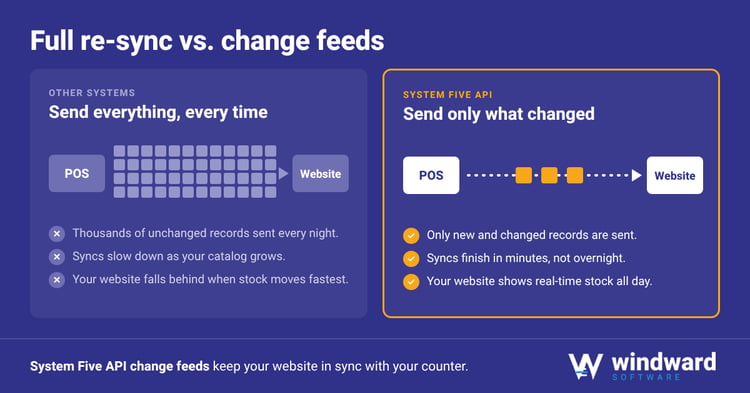
The System Five API's change feeds flip that around. Your website asks what changed since it last checked, and it gets only those records. The inventory change feed sends just the items that changed, and the customer change feed sends just the customers who did. A sync that used to take all night can finish in minutes, and it can run all day.
What businesses build with it
The most common project we see is an online store that runs on real-time stock and prices. We explain why that matters in "Why Should My E-Commerce Solution Be 'Talking To' My ERP?"
We also see businesses feeding their marketing platform from the customer change feed, so their customer lists update on their own. Some owners build dashboards that show sales without anyone exporting a report. And business-to-business (B2B) partners send orders straight in as invoices, with no one retyping them. For the bigger picture of how the System Five API fits with e-commerce and other connections, read "Bridging the Gap Between Online and Offline Channels."
Some businesses depend on a connection nobody sells off the shelf. For those, Windward offers custom development built on the API.
The API is one of several ways System Five connects to the other systems your business runs on
Getting your first integration running
Getting a first integration working is usually quicker than owners expect. It helps to know the steps before you talk to a developer.
- Pick one problem. Choose the information disconnect that hurts most, usually stale stock on your website or web orders that someone has to retype. Don't try to fix everything at once.
- Set up access. System Five API access is tied to real users, so your integration has its own identity and a record of everything it does from day one.
- Find what you need in Swagger. Use the Swagger guide for help with the integration you are looking to bring into your business.
 A good developer can usually get a first test working in an afternoon, because the guide answers the who, what, where and how questions that normally take weeks of email.
A frequent mistake people make early on is trying to sync every record in both directions right away. Take your time, change feeds make it easy to build one piece at a time. Let each one prove its worth before you build the next.
Questions to ask any POS vendor
If you're comparing systems, ask these questions in every demo, ours included. Here's how System Five answers each one.
- Can outside systems add and change data, or only read it? With System Five, they can do both. Outside systems can add items, create and update customers, and turn orders into real invoices.
- Does the API have change feeds, or is every sync a full export? System Five has change feeds for inventory and customers, so each sync sends only what changed.
- Is the documentation live and complete, or a PDF from two versions ago? System Five's documentation lives online in Swagger, so your developer can look up every request without waiting on anyone.
- Does every user get their own login, or does everything run on one shared key? In System Five, API access is tied to real users, so you can always see which system changed a record.
To see which other System Five features fit your business, check out the fit finder
Book a demo
If you work with a developer, in-house or outside, book a demo and bring them along. Have the Swagger guide and your questions ready. We are looking forward to answering them!

Share this article on