

Every time a customer pays by credit card, your store pays a processing fee, often 2% to 3% of the sale. On a busy store's card sales, that adds up to thousands of dollars a month. Many stores now pass that cost to the customers who choose to pay by credit, which is called a credit card surcharge.
Windward System Five handles surcharging at the point of sale (POS). It adds the right fee for each card type, shows the fee on invoices and receipts, and posts it to your accounting.
What is a credit card surcharge?
A credit card surcharge is a fee you add to a sale when the customer pays with a credit card. It covers some or all of what your store pays to accept the card. That cost goes to the card networks and your payment processor. Customers who pay with cash or debit don't pay the surcharge.
Surcharging is allowed in most of the U.S. and in Canada, but the card brands set rules for it. The main ones are:
- Credit only. You can't surcharge debit or prepaid cards, even when they're run as credit.
- A cap on the amount. Visa caps surcharges at 3% in the U.S. and 2.4% in Canada, and the fee can't be more than you actually pay to accept the card.
- Clear disclosure. Customers need to know about the surcharge before they pay, and it shows as its own line on the receipt.
- Advance notice. Card brands and your processor expect notice before you start.
Some states and provinces restrict or ban surcharging, so check the rules where you operate and talk to your processor before you turn it on.
Why surcharging goes wrong at the counter
Surcharging sounds simple, but a manual process leaves a lot of room for mistakes. Staff have to tell credit from debit, charge the right percentage and make sure the fee shows on the receipt.
Each mistake has a cost. A surcharge on a debit card breaks card-brand rules. A fee that some clerks waive and others charge turns into a fairness complaint, and a fee that doesn't show on the receipt leaves customers surprised and more likely to question it.
How System Five applies a credit card surcharge at the POS
System Five builds fees and surcharges into the payment step, so the system applies your rules on every sale. You set the rules once in System Five's payment processing setup.
Both options below need integrated card processing, where the personal identification number (PIN) pad at your counter connects straight to System Five instead of running as a separate operation. Our article on integrated payments vs. standalone systems explains the difference.
Apply credit card surcharges automatically
In the U.S., System Five can add the surcharge automatically. Where the customer pays at the PIN pad, the card type is read from the card itself and a credit card gets the surcharge while a debit card doesn't, with no decision from the clerk. You set the surcharge as a percentage or a fixed amount, with an optional minimum and maximum.
This option works with NETePay Hosted by Datacap Systems, the payment software that links System Five to your processor.
Set payment fees by card type
Payment fees give you a second option. You set one fee for credit and another for debit, again as a percentage or a fixed amount with an optional minimum and maximum. Where surcharging rules apply, you set the debit fee to zero.
With payment fees, the clerk chooses credit or debit when they take the payment. The Force Card Type setting backs that choice up. If the clerk selects debit and the customer uses a credit card, System Five rejects the card, so the wrong fee can't go through.
Show the fee on invoices and receipts
System Five prints the fee amount and its description on full-size invoices and slip receipts. For payment fees, you write the description once, such as "Credit card fee," and it appears the same way on every document. Customers see exactly what they paid and why, which also helps you meet disclosure rules.
Post fees where your accountant wants them
Every fee you collect has to land somewhere in your books. System Five posts it automatically to either a non-inventory item called PAYMENTFEE or a general ledger (GL) account you choose. The general ledger is the master record of all your business's accounts.
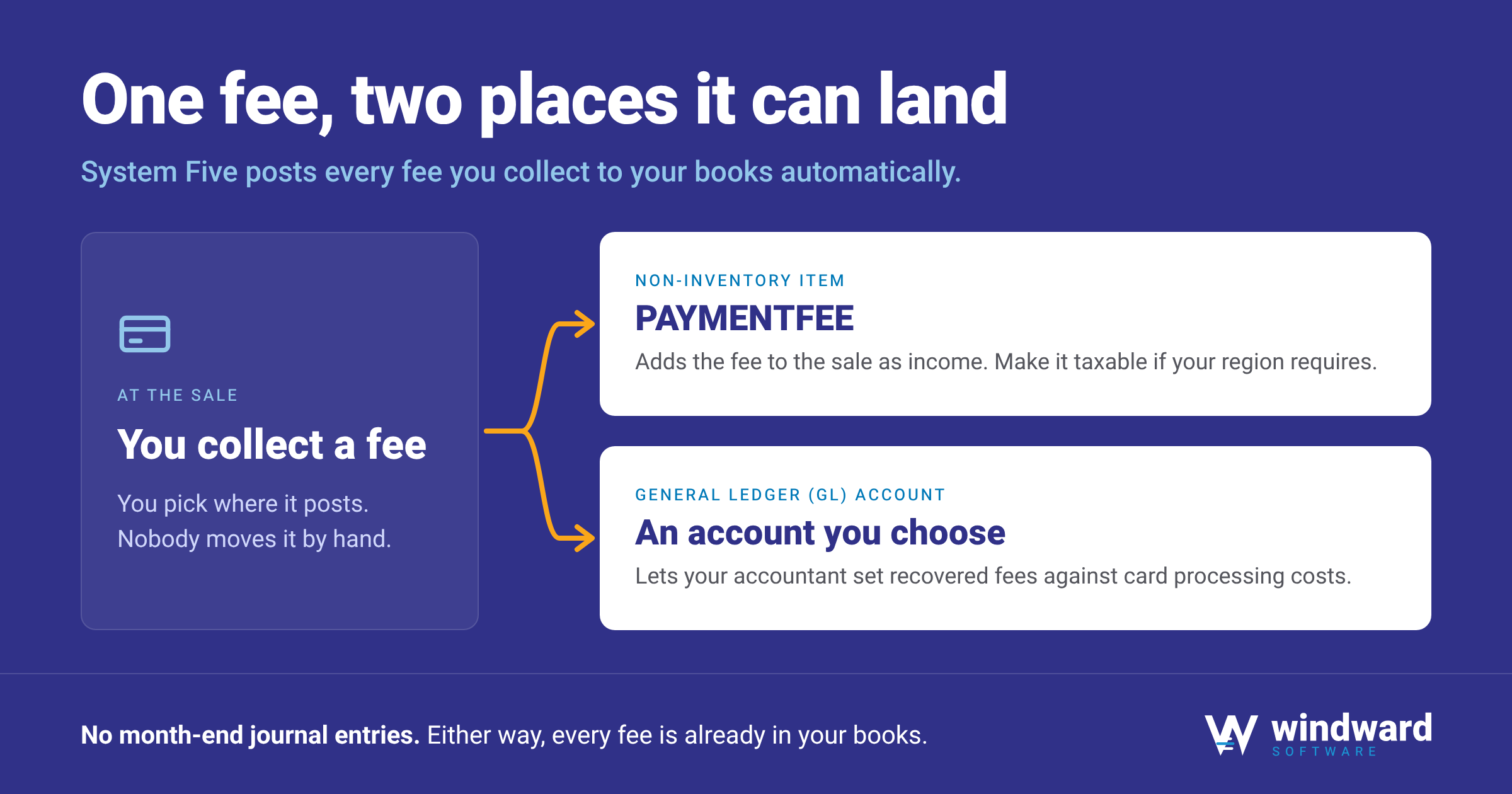
Posting to the item adds the fee to the sale as income, and you can make it taxable if your region requires. Posting to a ledger account lets your accountant set recovered fees against what you pay to process cards. Either way, nobody has to move fees around with journal entries at month-end.
Add fees to account and online payments
Not every card payment happens at the counter. An optional setting applies the same fee when an account customer pays their account statement by credit card.
Another setting adds fees to card payments that come in without a PIN pad, such as online orders. These run through PayAPI, the payment part of System Five's application programming interface (API). An API lets other software, such as your website, talk to System Five directly. Learn more about System Five's API.
What a credit card surcharge recovers
The figures below are an example, so swap in your own from your latest processing statement.
- Credit card sales. The store takes $150,000 a month in credit card sales.
- Processing cost. It pays 2.5% to process those sales, which is $3,750 a month or $45,000 a year.
- Consistent surcharge. A 2.5% surcharge on every credit sale recovers the full $3,750 a month. That rate is under Visa's 3% cap in the U.S. In Canada, the same store could charge no more than 2.4%.
- Inconsistent surcharge. If staff skip the fee on one in three credit sales, the store recovers $2,500 a month or $30,000 a year. It absorbs the other $15,000 itself.
Debit sales aren't surcharged, so the store still pays to process those. Some customers may also switch to debit or cash, which lowers both the surcharge collected and the processing bill.
Should your store add a credit card surcharge?
Surcharging is a business decision before it's a software setting. Some stores would rather build card costs into their prices and never show a fee line. Others, especially those with thin margins and big-ticket sales, can't keep absorbing 2% to 3% of every card sale.
 Small costs spread across every sale are a common way profit slips away, as we cover in "How to Avoid Margin Erosion or Even Worse, Selling Below Cost." If you give account customers special terms, decide up front whether card fees are part of them. "Effective Contract Pricing Management Made Easy" covers how System Five handles customer pricing agreements.
System Five supports either choice. You can turn surcharging on with the rules built in, or leave it off and price accordingly.
To see which other System Five features fit your business, check out the fit finder.
Book a demo today
If card fees have become a cost you've stopped noticing, book a demo. Ask to see a credit sale, a debit sale and an account payment run with surcharging turned on, and bring your latest processing statement so we can work through your real numbers.

Share this article on